Acuity Scheduling Templates 07: A Modern Brand Identity Toolkit
First impressions in the digital space are formed in milliseconds. For service-based businesses, consultants, and creative entrepreneurs, your scheduling interface is often the first point of real interaction with a client. It is where the browsing stops and the commitment begins. Acuity Scheduling Templates 07 addresses this critical moment by transforming a standard booking page into a cohesive, stylish extension of your brand. This is not merely a functional add-on; it is a design asset built to establish trust and professionalism before the client even sits in your chair or logs onto your call.
The Aesthetic Appeal: Adorable Meets Professional
The defining characteristic of this template kit is its balance between trendy visuals and professional utility. The design language leans into a modern, clean aesthetic that feels both fresh and timeless. It avoids the cold, corporate look of default booking widgets, offering instead an "adorable" yet sophisticated vibe that resonates with contemporary audiences. This style is particularly effective for industries such as wellness, beauty, life coaching, boutique agencies, and creative freelancers. The visual hierarchy is carefully constructed to guide the eye, ensuring that the booking process feels intuitive rather than transactional. By utilizing this design, you are signaling to your clients that you value details, quality, and the overall user experience.
What is Included in Your Digital Download?
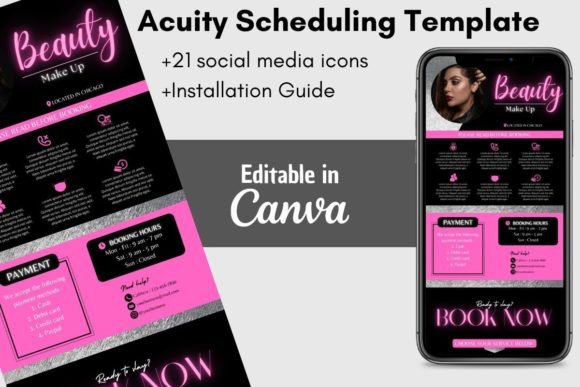
Upon purchase, you receive immediate access to a comprehensive digital package. This is a digital download, meaning there is no physical shipping involved—just instant access to your design files via Canva. The kit is structured to provide everything you need to launch a branded scheduling experience immediately. The package includes:
- A PDF file containing a direct link to access the template in Canva.
- 4 Pages/Banner Templates: Specifically sized at 2000x1000 pixels, these are optimized for the Acuity Scheduling header and social media banners.
- 21 Social Media Icons: A curated set of icons to ensure your footer or header links look consistent and professional.
- Installation Guide: A step-by-step manual to ensure you can upload and apply the design without technical headaches.
Seamless Customization for Brand Consistency
One of the primary hurdles with pre-made design assets is the difficulty of editing. Acuity Scheduling Templates 07 solves this by being 100% customizable within Canva. You do not need to be a graphic designer or own expensive software like Adobe Illustrator to make this work for you. The interface is drag-and-drop, allowing you to edit and save your work on any device, whether that is a desktop computer, a tablet, or a smartphone.
The scope of customization covers every critical element of brand identity:
- Typography: You can change the font style, color, and size directly. The template is designed to work with Canva’s extensive library, so you do not need to purchase or install additional fonts to achieve a high-end look.
- Imagery: You can easily upload and insert your own images or logo. This is crucial for recognition, ensuring that the booking page matches your website and business cards.
- Layout: You have full control to move or remove elements. If a specific graphic doesn't fit your service, simply delete it. If you want to emphasize a specific area, you can adjust the layout accordingly.
- Color Palette: Change the background and accent colors to match your existing brand identity. This ensures visual consistency across all your marketing channels.
Strategic Applications: Where This Template Shines
While the primary function is to beautify an Acuity booking page, the utility of Acuity Scheduling Templates 07 extends further. Because the assets are sized at 2000x1000 pixels, they are versatile enough for use in other digital and social media graphics.
Social Media Marketing
The banner size is perfect for Facebook headers, LinkedIn banners, and Twitter headers. By using the same design language on your social profiles as you do on your booking page, you create a seamless user journey. A client clicking from your Instagram story to your Facebook page and then to your booking link will experience a cohesive visual narrative, which builds subconscious trust.
Web Design Integration
For those using Acuity as a standalone page or embedding it into a web design project, these templates act as the bridge. They allow you to style the booking widget to look like a native part of your website, rather than a third-party tool. This is essential for maintaining a high-end look in editorial design and site architecture.
Digital Products and Courses
If you are a course creator or educator, the visual style of this template can influence your other design assets. The icons and layout structure can serve as inspiration for your course dashboards or resource libraries, ensuring that your entire ecosystem feels connected.
The Psychology of Design: Building Trust Through Visuals
In the world of modern typography and web design, aesthetics are not just about looking good; they are about psychology. A cluttered, ugly, or generic booking page can create hesitation. It can make a potential client wonder if the service will be equally disjointed.
Acuity Scheduling Templates 07 utilizes clean lines and a balanced layout to reduce cognitive load. When a client visits your page, the design should recede into the background, allowing the action—booking an appointment—to take center stage. The "adorable" and "trendy" aspects of the design appeal to a demographic that values modern aesthetics, such as millennials and Gen Z consumers who are accustomed to high-quality UI/UX in the apps they use daily.
Furthermore, the use of consistent social media icons and a structured grid creates a sense of order. This order implies professionalism. It tells the client that you are organized, attentive to detail, and serious about your business, even if your brand voice is playful and casual.
Practical Guidance for Implementation
To get the most out of this digital download, approach the customization process with a strategy. Do not just change the colors to your favorite shade; consider color theory and contrast.
- Readability First: When changing fonts, ensure there is high contrast between the text and the background. While script fonts or handwritten fonts look beautiful, they can be hard to read in small sizes. Use them for headers, but stick to a clean sans serif font for any instructional text.
- Logo Placement: Your logo should be prominent but not overwhelming. It needs to be recognizable at a glance.
- Testing: Once you have customized the template, preview it on both a desktop and a mobile phone. Most of your clients will likely book via mobile, so ensure the text is legible on smaller screens.
This template is an investment in your client experience. By taking the time to customize Acuity Scheduling Templates 07, you are effectively upgrading your customer service before the conversation even starts. It is a practical, affordable, and highly effective way to elevate your business presence in a crowded digital marketplace.