Arrows Keynote Templates: A Modern Blueprint for Impactful Slides
The Anatomy of a Truly Flexible Presentation
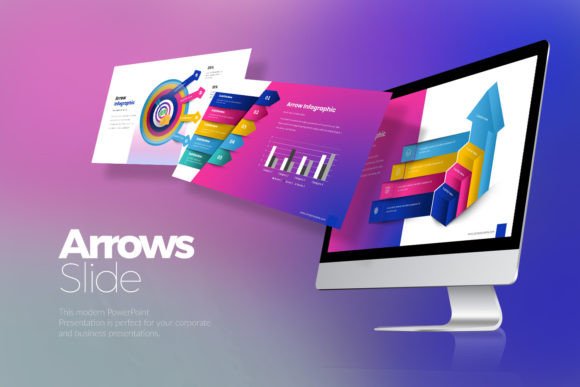
I have seen countless slide decks over the years, and the difference between a mediocre pitch and a winning one often comes down to the framework used to build it. Arrows Keynote Templates is not just a collection of slides; it is a design system built for clarity and impact. In the world of modern typography and layout, "clean" is often code for boring, but this template manages to be simple, unique, and scalable all at once. The visual personality here is defined by precision. It uses sharp lines and structured grids that guide the viewer’s eye naturally from one point to the next.
What I appreciate most about Arrows Keynote Templates is the lack of visual noise. It does not rely on flashy transitions or cluttered backgrounds to make a point. Instead, it uses whitespace intelligently, creating a breathing room that makes your content feel more premium. Whether you are a designer showcasing a portfolio or a small business owner outlining quarterly goals, the template provides a sophisticated backdrop. It feels like a high-end design asset rather than a generic file downloaded from the internet. The inclusion of 3 color schemes on both white and dark backgrounds means you can instantly switch the mood of your presentation to match your specific brand identity.
Practical Applications: From Corporate Boardrooms to Creative Studios
The versatility of Arrows Keynote Templates is where it truly shines. I often tell clients that a good template should be invisible; it should amplify the message without overshadowing it. This is why this specific file works so well for corporate and business presentations. Imagine walking into a stakeholder meeting. You need to project confidence and competence. The 16:9 aspect ratio looks fantastic on modern widescreen displays, and the structured layout helps maintain a professional rhythm throughout the talk.
However, do not mistake "corporate" for "rigid." Because the elements are fully editable, you have the freedom to adapt this for more creative ventures. Entrepreneurs and marketers can use the 30 unique slides to break down complex funnels or product roadmaps. Content creators and bloggers will find the image placeholder feature invaluable for creating visual-heavy media kits or brand pitch decks. It bridges the gap between editorial design and functional business tools. You are essentially getting a multipurpose toolkit that respects the rules of design while allowing you to break them when necessary.
Streamlining Your Workflow with Editable Assets
Time is a resource we never get back, and fiddling with slide masters is frustrating. One of the strongest features of Arrows Keynote Templates is the focus on user efficiency. The package includes 180 slides total, which gives you enough variety to keep your audience engaged over long presentations without running out of layouts. More importantly, the vector icons included in files are a lifesaver. Instead of searching for external icons that might not match your style guide, you have a cohesive set ready to go. This ensures visual consistency, which is crucial for brand recognition.
For those who deal with data, the fully editable charts are a standout feature. I have lost count of how many times I have seen presenters struggle with static chart images that cannot be updated. Here, the charts are editable in Excel, meaning you can update your numbers in real-time without breaking the design. This level of functionality is what separates a premium font or template experience from a standard one. It treats the user like a professional who needs tools that work as hard as they do.
Visual Hierarchy and Audience Engagement
Design is ultimately about communication, and Arrows Keynote Templates understands the language of visual hierarchy. By utilizing clean lines and distinct sections, it forces you to organize your thoughts. This is beneficial for visual hierarchy because it prevents you from cramming too much text onto a single slide. When your audience can easily scan the slide, their engagement levels stay high. It prevents the dreaded "wall of text" syndrome that plagues so many business meetings.
The scalable nature of the vector graphics ensures that your presentation looks crisp whether projected on a massive screen or viewed on a laptop during a Zoom call. This attention to detail influences how your audience perceives your professionalism. It sends a subconscious signal that you care about quality. For publishers or designers, this is non-negotiable. The documentation & quick guide file included in the package also ensures that even if you are not a Keynote expert, you can still navigate the file structure and customize it to your needs.
Maximizing Value and Customization
When evaluating design assets, I always look at the longevity of the product. With 6 file Key variations included, you are not just buying a one-time solution; you are investing in a library of options. The fact that it uses free fonts is a practical bonus that many overlook. It means you do not have to purchase expensive serif font or sans serif font licenses just to make the template look like the preview. This lowers the barrier to entry for hobbyists and small business owners who are watching their budget.
I recommend taking the time to explore the font pairing possibilities within the template. While the default typography is solid, swapping in a handwritten font or a bold display font for headers can completely change the personality of the deck to suit a specific campaign. Whether you are creating social media graphics to accompany your talk or a web design proposal, Arrows Keynote Templates provides the solid, creative foundation you need to present your ideas with clarity and style. It is a robust, unique solution for anyone serious about their visual communication.